

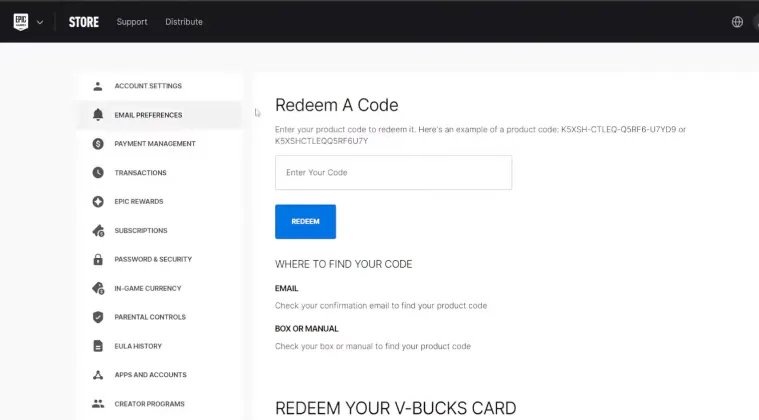
Follow these simple steps to redeem your V-Bucks:
Step 1: Go to the Official Redemption Page
Visit the Epic Games redemption page:
👉 https://www.epicgames.com/redeem
Step 2: Log In to Your Account
Sign in using your Epic Games account credentials.
Step 3: Enter Your V-Bucks Code
Type or paste your V-Bucks code carefully in the provided field.
Step 4: Confirm the Redemption
Click on Redeem, then confirm the details.
Step 5: Choose Your Platform
Select the platform where you want to use your V-Bucks (PlayStation, Xbox, PC, or Nintendo Switch).
Step 6: Enjoy Your V-Bucks
Once completed, your V-Bucks will be added to your account and ready to use in Fortnite.
Common Issues and How to Fix Them
Sometimes users face issues while redeeming V-Bucks. Here are the most common problems:
Invalid Code
- Double-check for typing errors
- Make sure the code hasn’t been used before
Region Restrictions
- Ensure your account region matches the code region
Platform Linking Issues
- Make sure your Epic Games account is linked to your console
Tips for a Smooth Redemption
- Always buy V-Bucks from trusted platforms
- Avoid sharing your code with anyone
- Redeem your code immediately after purchase
- Keep a screenshot of your code as backup
Why Buy V-Bucks Online?
Buying V-Bucks online is fast, convenient, and secure. You can receive your code instantly and redeem it within seconds.
It’s the best option for gamers who want to upgrade their Fortnite experience without delays.
Conclusion
Redeeming V-Bucks on Epic Games is a simple process that takes only a few minutes. By following this step-by-step guide, you can easily activate your code and start enjoying all the premium features in Fortnite.
Make sure to follow the correct steps and avoid common mistakes to ensure a smooth experience.
How to Redeem V-Bucks on Different Platforms
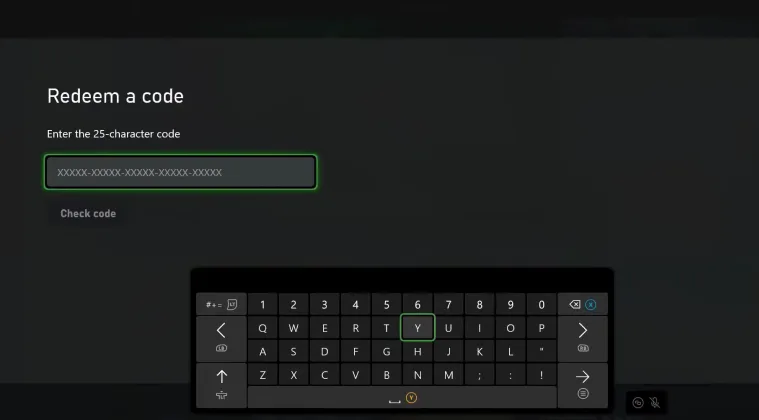
Redeeming V-Bucks on Epic Games is simple, but the process can slightly differ depending on your platform. In this section, we’ll explain how to redeem V-Bucks on each platform and answer the most common questions players have.
How to Redeem V-Bucks on PC
If you’re playing on PC, the process is the easiest:
- Go to the Epic Games redemption page
- Log in to your account
- Enter your V-Bucks code
- Click Redeem
- Your V-Bucks will be added instantly
👉 PC users don’t need any extra steps after redemption.
How to Redeem V-Bucks on PlayStation
For PlayStation users:
- Visit the Epic Games redeem page
- Log in to your account
- Enter your code and confirm
- Make sure your Epic Games account is linked to your PlayStation account
💡 After redemption, open Fortnite on your PlayStation to see your V-Bucks balance.
How to Redeem V-Bucks on Xbox
Follow these steps:
- Go to the Epic Games website
- Log in and enter your V-Bucks code
- Select Xbox as your platform
- Confirm the redemption
👉 Ensure your Xbox account is linked to Epic Games.
How to Redeem V-Bucks on Nintendo Switch
For Nintendo Switch players:
- Redeem your code on the Epic Games website
- Link your Nintendo account to Epic Games
- Launch Fortnite on your Switch
Your V-Bucks will be available instantly after syncing.
Important Notes About Platform Redemption
- V-Bucks are shared across platforms (except some limitations on certain consoles)
- Always redeem codes on the official Epic Games website
- Linking your accounts is essential for smooth access
Frequently Asked Questions (FAQs)
❓ Why is my V-Bucks code not working?
- Check for typing errors
- Ensure the code hasn’t been used
- Verify the region compatibility
❓ How long does it take to receive V-Bucks?
In most cases, V-Bucks are added instantly after redemption.
❓ Can I transfer V-Bucks between accounts?
No, V-Bucks cannot be transferred between different accounts.
❓ Do V-Bucks expire?
No, V-Bucks do not expire once added to your account.
❓ Is it safe to buy V-Bucks online?
Yes, as long as you purchase from a trusted and reliable store.
Final Tips
To avoid any issues:
Keep your account information private
Always double-check your code before submitting
Use a secure internet connection


No comment