

Google Play Store Gift Card Redemption Guide
What is a Google Play Gift Card?
A Google Play gift card is a prepaid code that allows you to purchase apps, games, movies, books, and other digital content from the Google Play Store. Each card has a fixed value, and once redeemed, the funds are added to your Google account balance.
How to Activate a Google Play Gift Card
Step 1: Scratch and Reveal the Code
If your gift card is physical, gently scratch the silver strip on the back to reveal the 16-character code. For digital cards, the code is usually sent via email.
Step 2: Open Google Play Store
- On your Android device, open the Google Play Store app.
- On desktop, go to play.google.com/redeem.
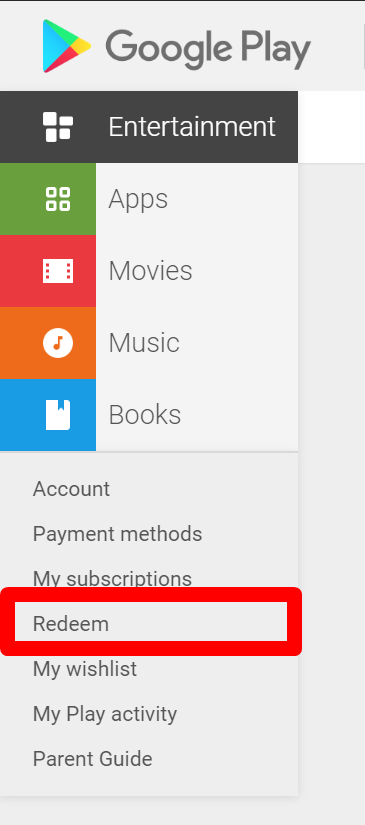
Step 3: Go to Redeem Section
- Tap the Profile Icon → Payments & subscriptions → Redeem gift code.
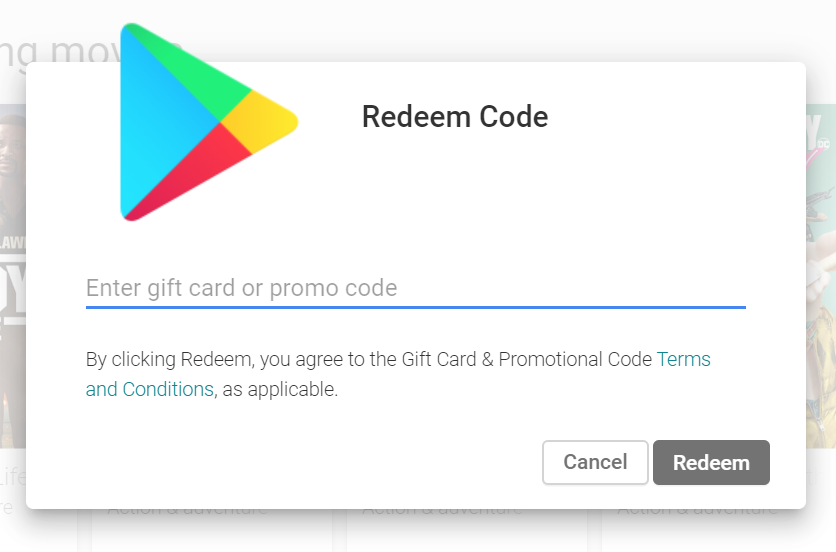
- On desktop, enter the code in the “Redeem your code” box.
Step 4: Enter the Code
Type the 16-character code exactly as shown. Double-check for typos.
Step 5: Confirm and Activate
Click Redeem . You’ll see a confirmation message, and your Google Play balance will update immediately.
Things to Know About Activate Google Play Gift Card
- Valid Only in Your Country: Cards are country-specific. A US card won’t work in Europe.
- Non-Refundable: Once redeemed, the code cannot be transferred or refunded.
- Expiration: Most Google Play gift cards don’t expire, but check the packaging.
- Purchasing: Available in major retail stores, online marketplaces, and trusted vendors.
FAQs
Q1: Can I use a Google Play card on multiple accounts?
A1: No, the balance is linked to the account that redeems it.
Q2: I received an error while redeeming. What should I do?
A2: Make sure the code matches your country, hasn’t been used, and is entered correctly. Contact Google Support if the issue persists.
Q3: Can I buy in-app purchases with a gift card?
A3: Yes, any purchase through Google Play, including subscriptions and in-app items, can be paid using your gift card balance.




No comment